- This topic has 131 replies, 2 voices, and was last updated 5 years, 7 months ago by
Anonymous.
-
AuthorPosts
-
-
dan
Participant02/17/2015 at 5:07 pm #58876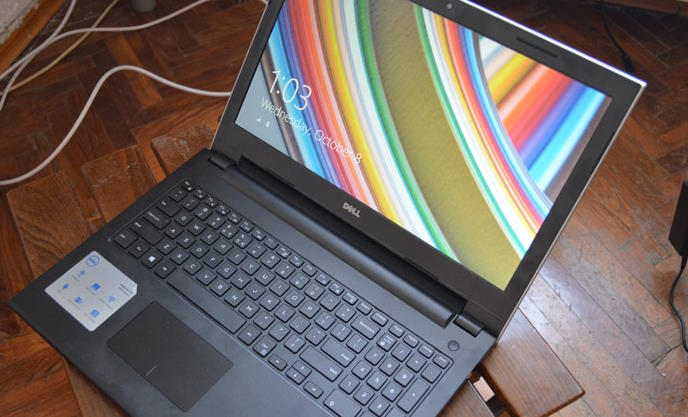
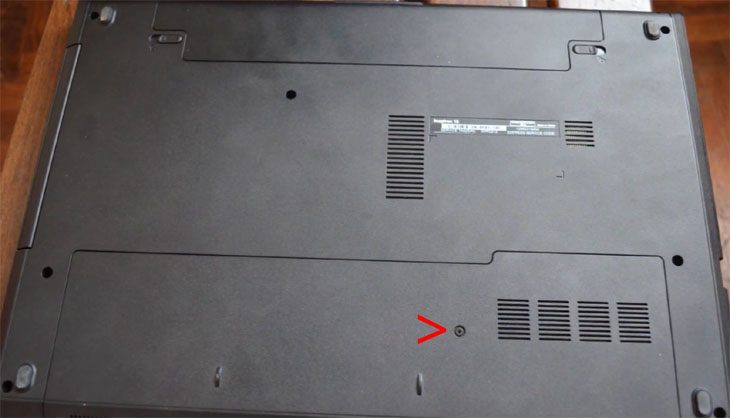
The Dell Inspiron 15 3000 is currently one of the best selling models among Windows-based laptops. Regarding system memory and hard drive upgrades, the 15 3000, or more precisely the 3543, 3542, and 3541, is very user-friendly. To access RAM and HDD, you just need to remove the plastic cover on the bottom of the chassis. The cover is held by only one screw, so doing operations such as replacing the pre-installed RAM or replacing pre-installed HDD with a solid state drive is a breeze.
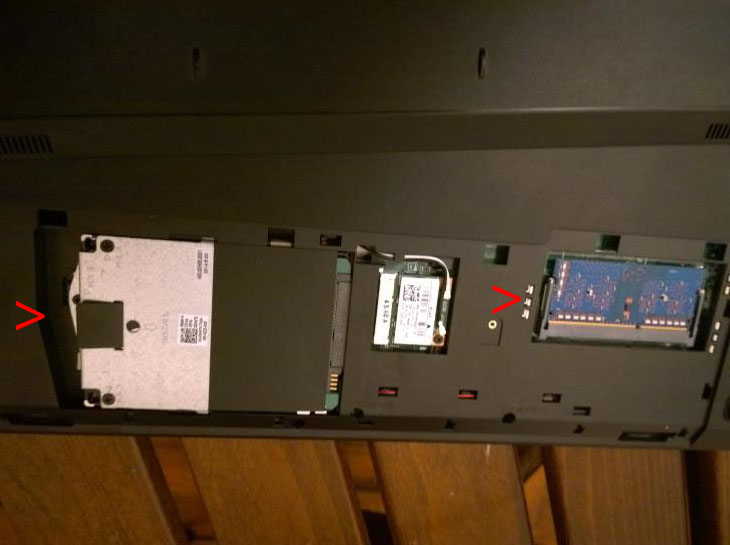
However, the notebook has only one memory slot, so you won’t be able to have more than 8GB RAM. It is the largest capacity on the RAM modules currently available on the market. The notebook supports DDR3L PC3L-12800 (1600MHz) SODIMM memory in the 204-pin form factor. As for storage, the bay is designed for 2.5-inch hard drives and solid state drives with SATA interface supporting up to 6 Gbps speed (SATA 3).
Before replacing the components, make sure your laptop is turned off, the battery is removed, and you’re grounded.
Once you’ve removed the base cover, to replace the existing memory module you’ll just need to pry apart the securing clips on the left and right sides of the memory slot until the module pops up and then you can take it out. To insert a new module, align the notch on it with the tab on the memory slot, slide the module into the slot at an angle, and press the module down until it clicks into place.
To install a new hard drive or solid state drive, remove the screw that secures the hard-drive assembly to the laptop base. Using the pull tab, slide the HDD assembly to disconnect it from the system board and take the assembly out of the computer base. Remove the screws that secure the hard-drive bracket to the hard drive, take the drive out and peel the Mylar sheet off. Put your new HDD or SSD in the bracket, adhere the Mylar sheet to it, put back the screws, place the assembly in the laptop, connect the drive connector to the system board connector, and put back the screw that secures the assembly to the laptop base.
-
Participant02/24/2015 at 12:17 pm #65989
Do you know the exact Inspiron 14 model? There’s a plenty of them… If it’s one of the latest Inspiron 14 versions – the Inspiron 14 3000 3451 or 3458, they have slightly different bottom panel and HDD assembly, while RAM upgrade procedure is the same as on the described 15 3000. The panel is held by 2 screws instead of 1, while the HDD assembly is secured to the base with 4 screws instead of 1. More about it (and upgrade instructions for other models) can be found here: http://www.dell.com/support/home/us/en/%7B%7Bprod.ImagePath%7D%7D/Products/laptop
-
Participant03/01/2015 at 8:29 am #65991
I haven’t tested any 16GB module on the laptop and can’t find any on the market. The largest so far are the 8GB ones, except this: http://www.intelligentmemory.com/dram-modules/ddr3-so-dimm/ But it isn’t widely available. Are you sure you’re able to get a single 16GB SO-DIMM module?
-
Anonymous
03/05/2015 at 6:42 am #65992These Intelligent Memory 16GB modules (type IMM2G64D3LSOD8AG-B15E) work on all laptops with the new Intel 5th generation Broadwell CPUs, but not on any older models.
The Dell Inspiron 15 3000 uses the 4th generation, so it does not work. But newer Dell Inspirons (released in 2015) are fine.
Check the CPU code! It always begins with i3, i5 or i7 and is then followed by a 4-digit number and a letter. If the 4-digit number starts with a 5 (for example i5-5200U), then it is 5th generation.In the USA you can buy here: https://squareup.com/market/MemphisElectronicRetail/imm-g-d-lsod-ag-b-e-1
otherwise Google the part# IMM2G64D3LSOD8AG
They are looking for more resellers, so if anybody has a favorite dealer, ask them to contact the manufacturer at info@intelligentmemory.com to get reseller-pricing
-
03/12/2015 at 12:48 pm #65993
I’m not too sure, i just read it from this article. “http://www.pcworld.com/article/2894509/want-32gb-of-ram-in-your-laptop-or-nuc-you-can-finally-do-it.html” . My CPU by the way is i7-5500u / 2.4GHz.
Thanks all for the replied…
-
03/27/2015 at 9:47 pm #65994
you can also get 16GB single modules in amazon (http://www.amazon.com/Corsair-Channel-SODIMM-Memory-CMSO16GX3M2A1333C9/dp/B006DI9PG8/ref=sr_1_13?s=pc&ie=UTF8&qid=1427510449&sr=1-13)
I just bought one for my new 3543, let’s see how it works
-
06/29/2015 at 10:02 am #66000
I have the Dell 14 3451….
I’m capable of replacing the RAM but I need to know if I can upgrade it all the way to 8GB’s.
Everything I’ve found so far says 4GB is the max…i.e. http://www.crucial.com and Dell’s website.
Just would like to know that I can put 8GB’s in it and that it will work fine.
-
Participant06/30/2015 at 4:41 am #66001
According to the official specs sheet by Dell, the 3541 can support 8GB on its single RAM slot. Check out the page 9 of this document: http://downloads.dell.com/Manuals/all-products/esuprt_laptop/esuprt_inspiron_laptop/inspiron-15-3541-laptop_Reference%20Guide_en-us.pdf
-
-
10/05/2015 at 3:17 am #66008
Kind of lies here.
They say opening the service cover is easy like a breeze, ant that is blsht! There are some plastic locks that are so hard, that for me it is impossible to open the cover without damaging the chassis. I need a manual explaining a way to open it without breaking the laptop apart. -
Participant10/06/2015 at 1:45 pm #66011
If you don’t damage any internal part, the warranty will be still valid after adding RAM.
If RAM usage of your opened Chrome tabs and other programs exceed 4GB, then your system will start using your hard drive for RAM purposes which will slow down the system a lot. In that case, 8GB RAM will significantly improve performance. If you’re usage is always below 4GB, you won’t notice big difference after adding more memory.
More about that in this post: https://laptoping.com/laptop-pc-ram-size-and-performance-explained.html
You can check your RAM usage in the Task Manager (shortcut: Ctrl+Shift+Escape).
-
12/09/2015 at 6:10 pm #66012
Does the Dell Inspiron 3542 have an M.2 PCI-E port on the Motherboard to be able to install a NVMe Solid State Drive like this one:
https://www.overclockers.co.uk/samsung-950-pro-256gb-m.2-pci-e-3.0-x-4-nvme-solid-state-drive-hd-215-sa.htmlCheers Guys
-
01/04/2016 at 3:31 pm #66013
We bought a DELL Inspiron 15 3000 series model 3543 with intel core of i3-5005U processor 4 GB memory and 1 TB hard drive. It ha Windows 10. It keeps getting kicked off the wifi. None of the other devices, laptops in the house have this problem and we even shut the other devices down to see if it was just an overload to the modem, but still gets kicked off even when we use the hotspot on my phone instead of the cable modem.
-
04/27/2016 at 3:38 am #66018
Hi
I got an Inspiron 3543 with the i7-5500U CPU @ 2.40GHz CPU
i want to upgrade the 4GB RAM whats the max that i can fit in?
And i would love to add a 256 GB SSD (if possible, dell offers only 128GB ones) while keeping the 500GB HD already inside.
Can i do that? or i have to choose only one module between a small SSD, a large HD and some 500GB hybrids dell offers in their support page. -
04/27/2016 at 4:19 am #66020
There’s one ram slot, so you can only take out the 4GB module and insert an 8GB one. I’m not sure whether the rare 16GB modules are supported on this laptop. There’s only one storage bay so you can’t have both HDD and SSD. But you can get a DVD caddy, put an SSD in it as replace the DVD drive with it.
-
05/06/2016 at 5:19 pm #66021
I have a recent purchased Dell 15 3000. Where is the RAM located on this machine. It has a solid bottom except for battery. I want to install more RAM, which I have bought from Crucial and I understand there is an open bay for it. Is it accessed under the keyboard?
-
05/22/2016 at 8:45 am #66024
I’ve been trying to find the same thing. It seems like Dell has redesigned the machine as every blog I look at suggests that solid bottoms are not a thing for Dell (Mine is an Inspiron 15 3558)- I’m wondering if we have to take the entire bottom off. Did you ever figure this out?
-
Participant05/22/2016 at 8:55 am #66025
The guide on this page is for the 3543, 3542, 3541 Inspiron 3000 models. The 3558 has different chassis design. It’s much harder to access RAM and storage for upgrades, since you have to remove the keyboard, optical drive (if present on the model) and many screws in order to remove the one-piece bottom of the chassis. You can find 3558 RAM upgrade instructions in its Service Manual on Dell.com.
-
05/26/2016 at 11:18 pm #66026
Hi Daniel! I found this info of immense use as I am thinking to upgrade RAM of my Inspiron 15 3541.However, I have a question on OS.If I replace my existing RAM of 2gb with 8gb, do I need to install/reactivate with OS.basically anything to do with software is required or not after changing RAM? Thanks.
-
-
06/08/2016 at 11:15 am #66031
Hi,
I require laptop for mainly coding-development work, playing hd movies/songs, playing PC games occasionally. My top most priority is high performance (without or less hanging/freezing issue) without causing overheating.
I heard i5-5200U/4210U is better than i3-5005U in terms of performance. But the laptop with i5 comes at much costlier than i3. Do you think paying extra bucks for 5th gen i5 really worth it in terms of performance?
FYI, I use linux for 70% of my day2day work. Rest 30% windows 7.
FYI, In both configurations, RAM is 4 GB DDR3L and hard disk is 1 TB 5400 RPM.
Does upgrading RAM from 4 to 8 GB compensates the extra performance of i5 ?
-
Participant06/08/2016 at 11:36 pm #66032
Among these 3 processors, the i5-4210U should be avoided because of weaker graphics than on the newer i5-5200U and i3-5005U. As for CPU performance, difference between the i5 and i3 should be only slightly noticeable in most tasks, except heavy stuff like converting video files where the i5 has advantage. Getting 8GB of RAM will help a lot if you utilize more than 4GB (such as running multiple apps and browser tabs at the same time). Otherwise, the difference won’t be noticeable, no matter what CPU is used. More about RAM usage here: https://laptoping.com/laptop-pc-ram-size-and-performance-explained.html
-
08/12/2016 at 4:39 pm #66034
Everyone keeps talking about the second tab on the back. Mine doesn’t have one. I’ve unscrewed literally every screw on the back of my laptop and I still can’t open it. It says 3000 series but the only things I keep finding are for some tab in the back that mine doesn’t have so what do I do?
-
Participant05/30/2017 at 6:05 am #66039
Can you tell whether you have a SSD or hard drive inside and what’s your RAM size? Upgrading to an SDD if you’re currently running your system on HDD would be the greatest improvement you can get in this case. Also, upgrading RAM to 8GB if you have only 4GB might help. Besides that, you can check in Windows Task Manager if there’s any software process that chokes your system.
The i5 processor you have is a great one for all usual computing tasks.
-
07/06/2017 at 2:23 am #66042
Sir,presently I’m using Dell Inspiron 15 3000 series preloaded with 4gb ram,1tb hard disk,2gb graphics.As I’m training on SAP the complieing time is too slow so I decided to upgrade the RAM. Suggest the best one and the GB too ,upto which extend it can be upgraded.
Regards,
Kundan. -
-
09/12/2017 at 1:07 pm #66045
What model do you have? Is it 15 3000 3543, 3542, 3541, or some other model? If you have one of the above and you currently use 4GB RAM, you can replace that module with 8GB. But, it’s not certain whether your laptop will work faster, since many other factors play a role in speed. Primarily the processor and storage (HDD or SSD).
-
09/14/2017 at 3:09 pm #66047
Hi, I have no info on whether the Dell 15 3000 supports these large SSDs. It’s very uncommon to put a pricey 1TB or larger SSD in a budget laptop like the 15 3000, so that’s probably why there’s no info online about that combination. I’m however sure you can use an SSD with up to 512GB capacity inside this laptop.
-
09/15/2017 at 2:31 pm #66048
Hey awesome Article. The explanation was easy and very useful for me.
I recently bought Kingston 240GB SSD for my Dell Inspiron 3542.
Could you explain me how can i clone my previous HDD in the SSD so that i dont have to install the windows as well as the programs from scratch? -
Participant09/15/2017 at 3:09 pm #66049
Cloning of a laptop hard drive to SSD can be done with cloning software and adapter (or storage enclosure) from USB to data interface (i.e. SATA, M.2…) on your SSD. You can install cloning software, such as the popular EaseUS Todo Backup Free or Macrium Reflect Free or other, on your existing HDD. Then connect the SSD via USB and use installed cloning software to clone the HDD to SSD. Make sure your used storage space on HDD is not larger than your SSD capacity. After cloning is done, you can then physically put the SSD in your laptop. That’s a general explanation. I hope it helps.
-
12/26/2017 at 10:19 am #66056
I have a Dell 3541 series laptop. Just upgraded to a SSD drive, performance has increased. The RAM is at the MAX, 8gb, would a different brand help performance? Also, what upgrade could I add to improve the WLAN module in the bottom? Is there aftermarket that will fit?
-
12/26/2017 at 4:53 pm #66057
A different RAM brand won’t noticeably improve performance, even if it has better memory specs (RAM speed, latency, etc). As for the WLAN card, you probably have an 802.11N card built-in. It’s a replaceable mini PCIe card, so you can for instance put a 802.11AC mini PCIe card in for improved wireless speed and range. But, you will have to use it with an 802.11AC router to actually get these improvements.
-
Participant01/24/2018 at 9:02 pm #66060
It should help definitely, because you have only 2GB RAM. But, you will have to get a compatible RAM module. I think it’s DDR3L RAM, although I don’t know for sure about your particular laptop. You should check whether it’s DDR3 or DDR3L. Also, your Windows 10 should be a 64-bit version in order to recognize more than 3.5GB RAM. 8GB RAM will work under 32-bit Windows, but you won’t be able to use more than around 3.5GB. Another important thing is to check whether your processor supports 8GB RAM, I don’t know what model you have, but it probably does support 8GB.
-
02/16/2018 at 3:36 pm #66063
Hey there…
Got a Dell Inspiron 3543 with Processor Intel(R) Core(TM) i5-5200U CPU @ 2.20GHz, 2201 Mhz, 2 Core(s), 4 Logical Processor(s)…4GB RAM and 500GB Hard disc… I want to upgrade him with 8GB RAM and an SSD….Which one do you recommend me for about max 170 euros…. Ty mate…Great job -
03/05/2018 at 6:37 am #66065
The 3567 has two RAM slots. So if you have only one slot populated (most likely that’s the case) than you can add another 4GB. As for HDD the laptop has a single HDD bay, so you can’t add another one. But, you can buy a compatible optical drive HDD caddy and put a HDD in it. That basically replaces your DVD drive with an HDD drive.
-
04/15/2018 at 10:04 am #66066
I have an old dell inspiron 3542 with i3,4gb ram, 512gb hdd, 2gb nvidia 820m,windows 8.1
-Is there any m.2 ssd port on this laptop and will a 2.5 inch ssd fit in it ?
-Is there a need of reinstalling windows & drivers if i upgrade to new ssd or can i just copy files ?
-How many ram slots are there and can i upgrade ram to 16gb ? -
04/15/2018 at 12:21 pm #66067
The laptop doesn’t have an M.2 SSD slot and M.2 generally isn’t compatible with 2.5″ SSDs. You can only replace your existing HDD with a 2.5″ SSD. That requires either re-installation of Windows or cloning the hard drive and copying it on a new SSD. The laptop has only one RAM slot. I can’t confirm whether 16GB single RAM modules are supported by the motherboard or not. A compatible 8GB RAM module is supported for sure.
-
06/05/2018 at 7:46 am #66072
Hi, Thanks for the article. I also have a Dell 15 3000 series and the 4gb is way too slow. It is running win 10 at the moment.
I’m just wondering if I can use Crucial 16GB Single DDR3L 1600 MT/s (PC3L-12800) 204-Pin SODIMM Memory to upgrade the RAM.
Thanks again,Amit
-
06/05/2018 at 8:05 am #66073
Hi, I have checked Crucial website and it appears the older Dell 15 3000 series with DDR3L memory support only up to 8GB sticks. There’s no a 16GB option for them. Only newer 15 3000 3567 supports 16GB DDR4. I remember that back in 2014/2015, when the 15 3000 series laptops were released, that their motherboards were lacking support for 16GB RAM sticks. I don’t know if later BIOS updates added support for it. It’s maybe the best option to contact Dell’s support and ask about that. Regards!
-
06/19/2018 at 4:10 am #66074
Hi,
I’m using del Inspiron 3543 8gb ram, I wan to buy a crucial mx500 250 GB SSD for my laptop and I want to put that SSD in main hard disk slot and replace hard disk to optical drive slot. Is it better way or is there any other ways to improve performance, Is my laptop support crucial mx500 SSD -
06/19/2018 at 4:11 am #66075
Hi,
I’m using del Inspiron 3543 8gb ram, I wan to buy a crucial mx500 250 GB SSD for my laptop and I want to put that SSD in main hard disk slot and replace hard disk to optical drive slot. Is it better way or is there any other ways to improve performance, Is my laptop support crucial mx500 SSD -
07/29/2018 at 10:30 pm #66084
Hello Bro,
I have Dell i3 6006U 6th gen inspiron 15 3567 model laptop. I want to know that how many slot have for RAM and SSD in my laptop. I want to add new RAM and SSD. Currently it has HDD 5400rpm. I want to add not replace. is it possible? please know me if two slot of RAM. can I use both or need to replace current slot.
how many ram max I can use. -
Participant07/30/2018 at 5:09 am #66085
Hi, as per the Dell Inspirion 3567 service manual, there are two RAM slots:
https://topics-cdn.dell.com/pdf/inspiron-15-3567-laptop_service-manual_en-us.pdf
I don’t know if both of your slots are populated. Do you have for instance 1 x 8GB or 2 x 4GB inside. If you have a single RAM module, than you can just insert a compatible RAM module in the second slot. Otherwise, you’ll need to take out one or both RAM modules and replace it with more capacious ones.
As for storage, the laptop has a single 2.5″ storage bay (populated with your HDD). It has no M.2 slot for SSDs. You can only get a DVD caddy (adapter) to replace your DVD drive with an 2.5″ SSD SATA drive. -
08/23/2018 at 2:23 pm #66087
Are you sure your laptop has an M.2 SSD slot? As far as I know, the Inspiron 15 3567 doesn’t have an M.2 SSD slot, so you can’t add that SSD besides the existing HDD.
Generally, if you add an SSD (PCIE NVME or SATA) to a laptop which already has HDD, files and programs stored on the SSD will run faster. If the notebook and SSD support PCIE NVME, speed will be faster than with SATA SSD. Files and programs stored on the HDD will run on slower HDD (SATA) speeds. A good practice in that situation is to install Windows and programs on SSD and put rarely accessed files on the HDD.
-
Participant10/25/2018 at 10:25 am #66093
Yes, it does make sense safety-wise, because the optical bay isn’t meant to be used for internal 2.5″ drives and HDDs are more prone to physical damage than SSDs. But I would also take into consideration where the OS is installed. For better performance it should be installed on the SSD. So from that point of view, it is maybe better to have your OS on the SSD drive in the safer 2.5″ bay and less important files on the HDD in the DVD bay.
-
11/07/2018 at 7:57 am #66095
Planning to buy Dell inspiron 3000 which come with 4gb ram can I upgrade it to 8 gb in future.as u said it comes with one slot I guss in it that 4gb ram is there removing it & replace with 8gb
Sir can u help in selection of laptops Asus vivo book 507 i3 with 7th 8gb ram 2 gb graphics or Dell inspiron which 4gb or else should I select Pentium core
-
05/24/2019 at 4:20 pm #66102
I would like to know if replacing CD Drive with HDD after SSD upgrade have any problems with heating. Usually my HDD gets heated and I am worried if any heating problem could occur. Also does SSD gets heated as well like HDD?
My laptop is DELL Inspiron 15 3542 (4GB RAM, Intel i5 4th gen) -
Participant
-
-
AuthorPosts